
Why Windows 11 Blocks Legitimate Hardware & Monitoring Utilities
Starting in Windows 11 22H2, 23H2, and 24H2, Microsoft enables the Vulnerable Driver Blocklist inside Code Integrity (CI). While intended as a kernel security layer, it frequently blocks popular signed hardware utilities and older motherboard/RGB software from loading their kernel driver.
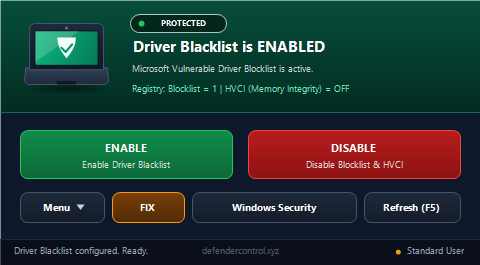
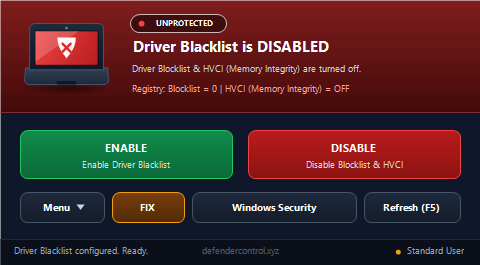
Driver Blacklist Control gives power users an instant Sordum-style dark-mode switch for:
- Exact Registry Key:
HKEY_LOCAL_MACHINE\SYSTEM\CurrentControlSet\Control\CI\Config→VulnerableDriverBlocklistEnable(1= Enabled,0= Disabled). - Affected Tools & Drivers Often Blocked by Blocklist Updates:
WinRing0.sys/WinRing0x64.sys,ThrottleStop,FanControl,OpenRGB,ene.sys/EneIo64.sys(RGB lighting),AsrDrv106.sys,CPU-Z,HWiNFO,RWEverything, and legacy peripheral drivers. - Kernel Reboot Awareness: Prompts cleanly to restart Windows after updating
CI\Configso changes apply cleanly at kernel boot.
Visual Previews (Laptop + Shield Status)
Silent Command-Line Automation (CLI)
Supports both slash and hyphen CLI arguments for scripts and custom Windows builds:
"Driver Blacklist Control.exe" /disable
"Driver Blacklist Control.exe" /enable
"Driver Blacklist Control.exe" -disable
"Driver Blacklist Control.exe" -enableOfficial SHA-256 Verification
EXE SHA-256:
7F3A1831CC5302A78C948A868337C63EFDF48266509909A5D8E531EEB7325F0B